A Lottie editor for builders who do not use After Effects
Building with Cursor, Lovable, Bolt, v0, or another AI workflow? Customize downloaded Lottie animations without becoming a motion designer.
The problem
Vibe coding tools make it easy to ship a polished interface, but motion design is still a gap. You can ask AI for layout, copy, and components; you still need a usable animation that matches your product.
The fastest path is downloading a public Lottie animation and adapting it. But most builders do not have After Effects, do not know Bodymovin, and do not want to learn animation software just to swap one screenshot or illustration.
That mismatch creates a common failure mode: the app looks nearly finished, but the animation still contains a generic placeholder asset that makes the whole page feel unfinished.
The browser workflow
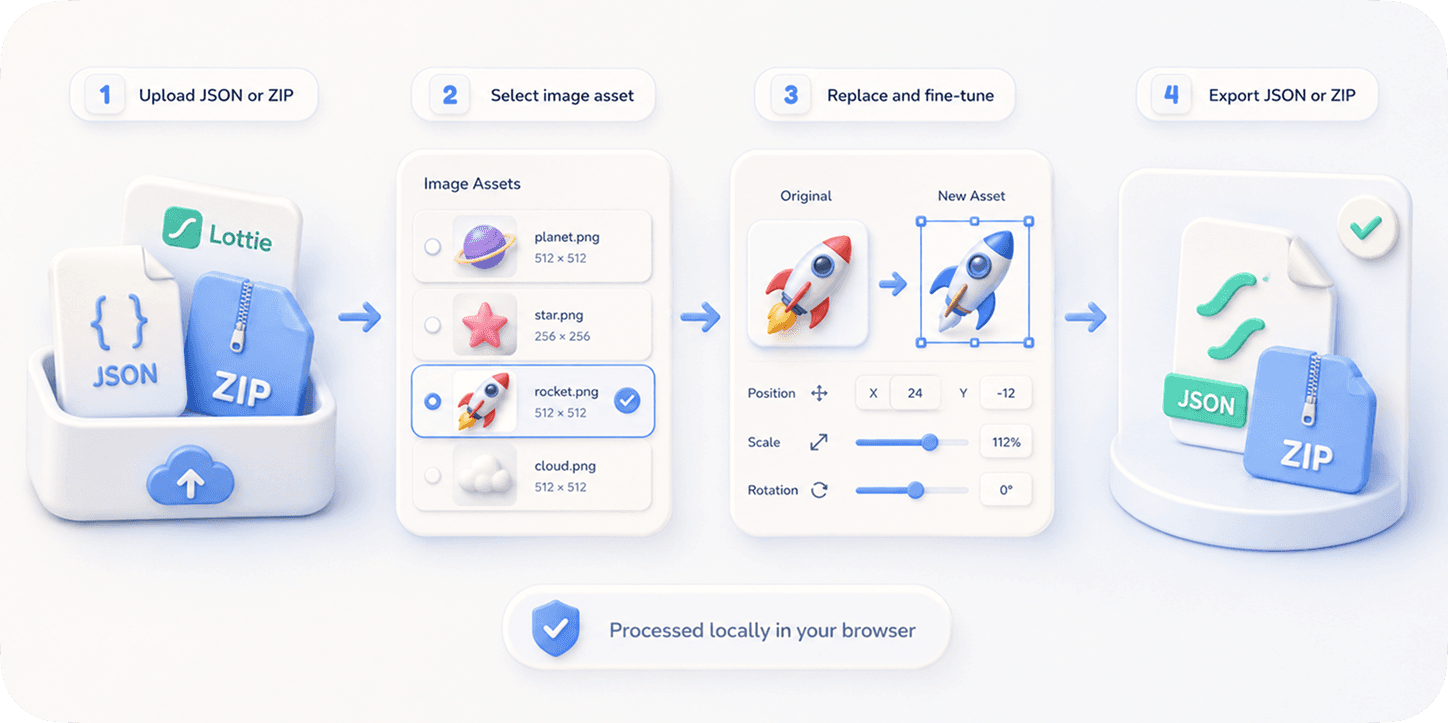
EasyLottie gives builders a narrow, practical editing surface: replace images inside an existing Lottie file, adjust the asset fit, preview immediately, and export.
It is not a motion design suite. That is the point. It handles the exact edits developers and AI-assisted builders need after downloading a Lottie asset: personalize screenshots, replace logos, localize visual assets, and keep the animation working.
Because everything runs in the browser, it fits builder workflows: no install, no account, no upload, no design handoff, no After Effects subscription.
Complete the task
Find an animation that matches your UI intent
Use a public Lottie library for onboarding, empty states, loading states, feature callouts, or landing page heroes.
Customize the visible assets
Upload the downloaded JSON or ZIP to Image Replace and swap generic illustrations, screenshots, avatars, or logos with assets from your product.
Preview the result in context
Use the browser preview to verify sizing, motion, and visual fit before adding the file to your app.
Export and ship
Download the edited Lottie file or ZIP, then use it in your React app, Framer page, Webflow site, or mobile project.
Iterate like code
If the visual does not fit, replace another image, adjust position, export again. No motion design handoff required.
Common use cases
AI-built landing pages
Add a real product-specific animation to a generated landing page without asking a designer for custom motion.
Hackathon demos
Customize a downloaded Lottie in minutes so the demo looks intentional instead of template-based.
Indie app onboarding
Replace generic screenshots inside onboarding animations with your actual app screens.
Frequently asked questions
Is this made for people with no design background?
Yes. EasyLottie focuses on practical asset replacement, not motion authoring. If you can upload an image and preview the result, you can use it.
Can I use it with animations generated or recommended by AI tools?
Yes. If the result is a standard Lottie JSON or ZIP with image assets, you can customize it in EasyLottie.
Does this replace a designer?
No. It helps builders customize existing Lottie assets quickly. For original motion design, a designer and After Effects are still the right tools.
Can I use the exported file in React?
Yes. Exported files work with lottie-web and React wrappers such as lottie-react or dotLottie players when the underlying Lottie format is supported.
Why not just ask AI to generate the animation?
AI-generated animation workflows are improving, but downloaded Lottie templates are still more reliable for production. EasyLottie lets you personalize those reliable assets.