Swap a brand logo inside a Lottie animation
Bought a Lottie template and need to put your own logo in it? Drop the file, drop your logo, export. 30 seconds.
The problem
Lottie template marketplaces (LottieFiles, IconScout, MotionElements) sell thousands of polished animations — but they ship with placeholder logos. Before you can use one on your landing page or in your app, you need to replace that placeholder with your own brand mark.
The template usually ships as a JSON or ZIP. The placeholder is embedded as a PNG asset, sometimes referenced by name like "img_0.png", "logo.png", or an unhelpful "image_5.png". You have no obvious way to edit it.
Asking the original designer to swap it costs $50+ and 2 days. Doing it in After Effects requires the .aep source which is usually not included with template purchases.
The browser workflow
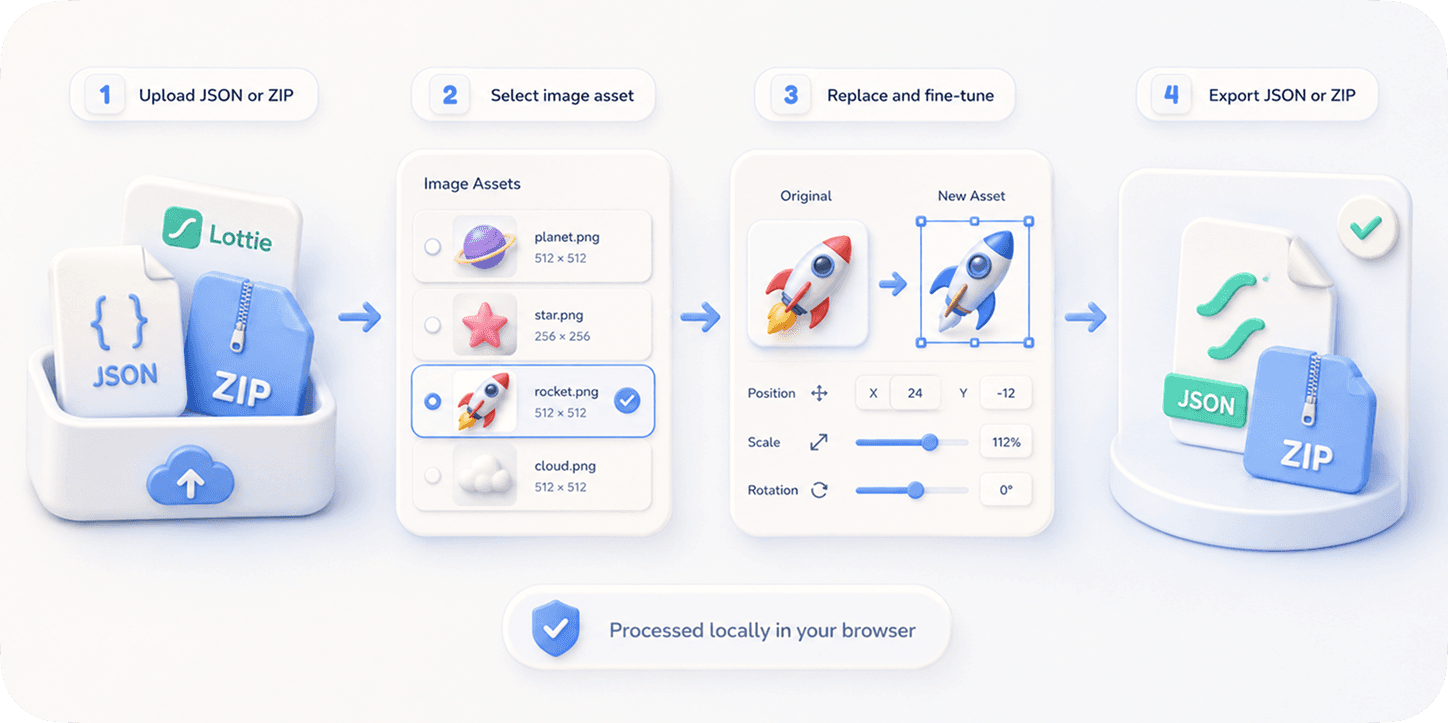
EasyLottie's ImageReplace tool detects every image asset inside the template (regardless of how it's named) and shows them all in a sidebar with thumbnails. You click the logo thumbnail, drop in your brand asset, and export.
The whole tool understands the two common Lottie packaging formats: .json with base64-embedded images, and .zip with external image files plus the JSON. Either way, your edited export ships as a clean ZIP that works in every Lottie runtime.
The Pixel-precise position fine-tuning helps when your logo has different proportions than the placeholder — you can scale, offset, and crop until it lands exactly where you want.
Complete the task
Identify your template file
Get the .json or .zip from your template marketplace download.
Open easylottie.com/imagereplace
Free, no signup. Loads in under a second.
Drop the template in
The preview renders the animation playing live; the right panel lists every image asset.
Find and click the logo placeholder
You can click the logo directly in the preview, or browse the asset thumbnails on the right.
Drop in your brand logo
PNG with transparent background works best. If your logo has different proportions, use the fine-tune controls to scale and position it.
Export the customized template
Download the new ZIP. It's ready to embed in your site, app, email, or wherever you license the template for.
Common use cases
Marketplace template customization
You bought a Lottie hero animation for your SaaS landing page. Swap the placeholder logo for yours, ship the same day.
Brand white-labeling
You sell Lottie templates and need to deliver a custom-logo version to each client. ImageReplace makes this a 30-second per-client task.
Agency client work
Your agency uses the same hero animation across 8 clients with their respective logos — batch-produce all 8 in 5 minutes.
Frequently asked questions
What logo file format works best?
PNG with a transparent background. SVG is not supported as a layer asset in Lottie's image layer model — but most templates accept PNG even when the original was vector.
My logo has different proportions than the placeholder — will it stretch?
Not unless you choose to. The fine-tune controls let you scale uniformly, offset, and crop. The default behavior preserves your logo's aspect ratio.
Can I keep the original placeholder for reference?
Yes. The export ZIP contains both the new replaced asset and the original — you can always revert by editing the JSON's asset reference back.
Does this work for animated logos?
For static image layers, yes. If the "logo" in the template is itself an animated layer composition (rare), you'd need to edit it in After Effects.
Is my logo uploaded to your server?
No. Everything runs in your browser. Your logo never leaves your device.