Customize a Lottie animation downloaded from IconScout
IconScout gives you the JSON, not the After Effects source. EasyLottie lets you swap its placeholder assets and recolor it anyway — in the browser, in seconds.
The problem
IconScout is a deep, well-curated Lottie library, and a download lands in your project in minutes. The friction starts right after: the animation ships with the creator's placeholder imagery and a palette that has nothing to do with your brand, and it has to change before it ships.
An IconScout download is a Lottie .json or .zip — almost never the After Effects .aep source. So the standard advice (open the project file, swap the asset, re-export) simply does not apply: there is no project file to open, and the original creator is not on your team.
Editing the downloaded JSON by hand is the fragile fallback. Image assets may be base64-embedded or zipped, colors are scattered across many shape layers as raw RGB arrays, and one wrong edit silently breaks the animation in a way that is hard to debug.
The browser workflow
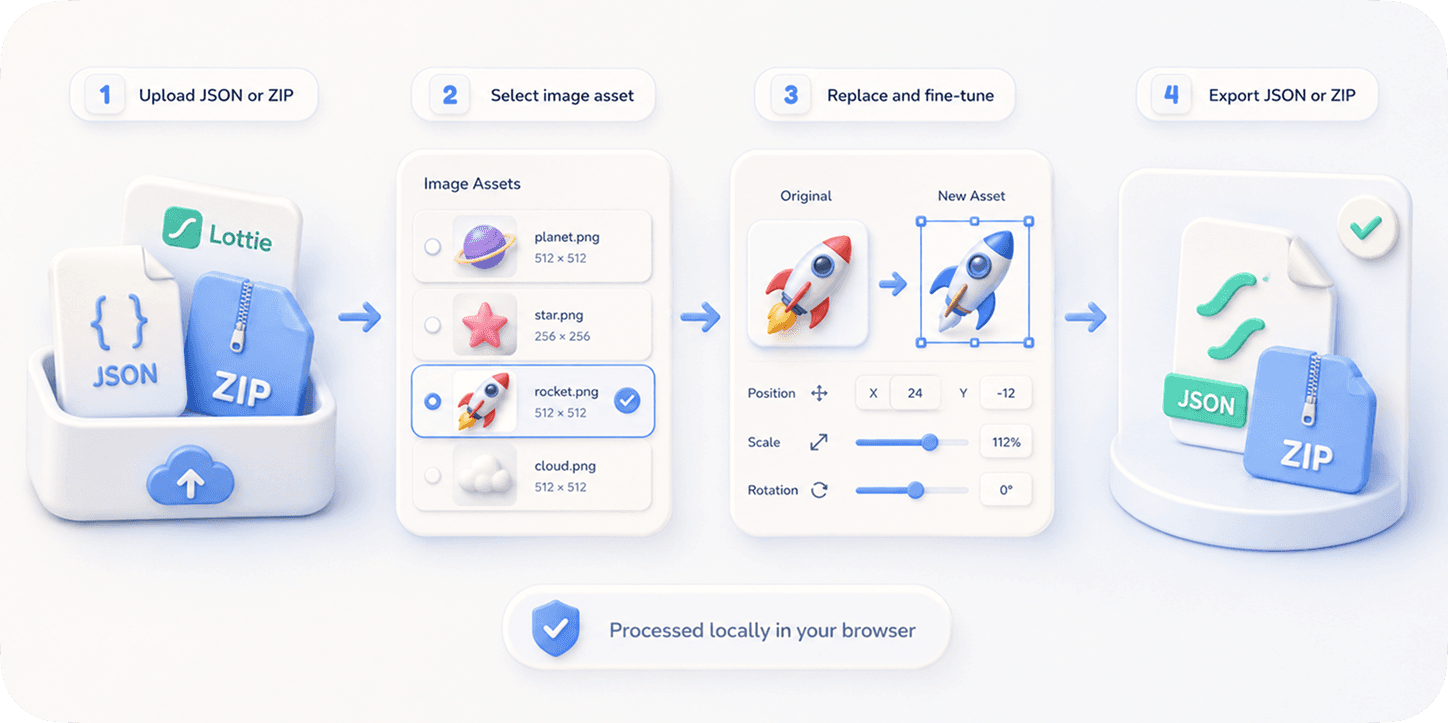
EasyLottie is built for exactly this: customizing a Lottie when all you have is the exported file. Drop the IconScout .json or .zip into Image Replace and it detects every embedded image asset — placeholder illustrations, icons, screenshots, logos — and shows them as clickable thumbnails to swap.
For the palette, Color Swap reads the colors out of the animation and lets you re-map each one to your own hex values, with a live preview and a 20-step undo so you can explore without fear. Neither tool needs the .aep source, an account, or After Effects.
It is 100% free and fully local — the IconScout file you licensed and your replacement assets are processed in your browser and never uploaded. When you are done, export a clean ZIP that drops straight into React, Webflow, Framer, or a native app and plays in every Lottie runtime.
Complete the task
Download the Lottie from IconScout
Grab the Lottie .json or .zip from your IconScout download. You do not need any After Effects source file — the exported Lottie is enough.
Open EasyLottie Image Replace
Go to easylottie.com/imagereplace. It loads instantly, runs locally, and asks for no signup — so your licensed file stays on your machine.
Upload and inspect the assets
Drop the file in. The animation renders live and the resource panel lists every image asset, even the ones IconScout named generically like img_0.png.
Swap the placeholder assets
Click a placeholder illustration, icon, or logo and drop in your own PNG / JPG / WebP. Use the fine-tune controls to match the new asset's proportions to the original.
Recolor, then export
Switch to Color Swap to re-map the palette to your brand, then export a production-ready Lottie package — JSON plus assets — ready to ship.
Common use cases
Brandable IconScout illustrations
Take a downloaded IconScout hero or spot illustration and replace its placeholder graphics and palette with your own, so it stops looking like stock.
Icon animation personalization
Customize an animated IconScout icon set by recoloring it to your design system and swapping any embedded image assets.
Marketing micro-animations
Adapt a downloaded loader or empty-state animation to your product's look without commissioning custom motion.
Frequently asked questions
Can I edit an IconScout Lottie without the After Effects file?
Yes. EasyLottie works from the exported .json or .zip alone. If the animation contains image assets, Image Replace detects and swaps them; Color Swap handles the palette. No .aep needed.
Does this respect IconScout's license?
EasyLottie is just an editor — it does not change your license. Customizing an asset you have legitimately licensed is fine, but always follow IconScout's license terms for your use case.
Can I recolor the animation, not just swap images?
Yes. Color Swap reads every color in the animation and lets you re-map each to your own hex value, with a live preview and 20-step undo.
The image assets have generic names — can the tool still find them?
Yes. EasyLottie detects assets regardless of how IconScout named them and shows each as a thumbnail, so you identify the right layer visually rather than by filename.
Is my licensed IconScout file uploaded to a server?
No. Everything runs in your browser. The source file and your replacement assets never leave your device.