Lottie Viewer & JSON Preview Online
Open, play, inspect, and test Lottie JSON, ZIP or .lottie animations instantly. Adjust speed, loop mode, transparent background, and dimensions without uploading your files.
Drop files here
or click the button to choose files
Supports .json and .zip files
Upload multiple files for preview
Use the control panel to adjust playback and preview size
Processing files...
Previewed it? Do more with this Lottie:
Preview, test, and inspect before you edit or ship
Use Preview to upload a Lottie file, test playback, switch backgrounds, check metadata, and decide whether the animation needs color or image edits.
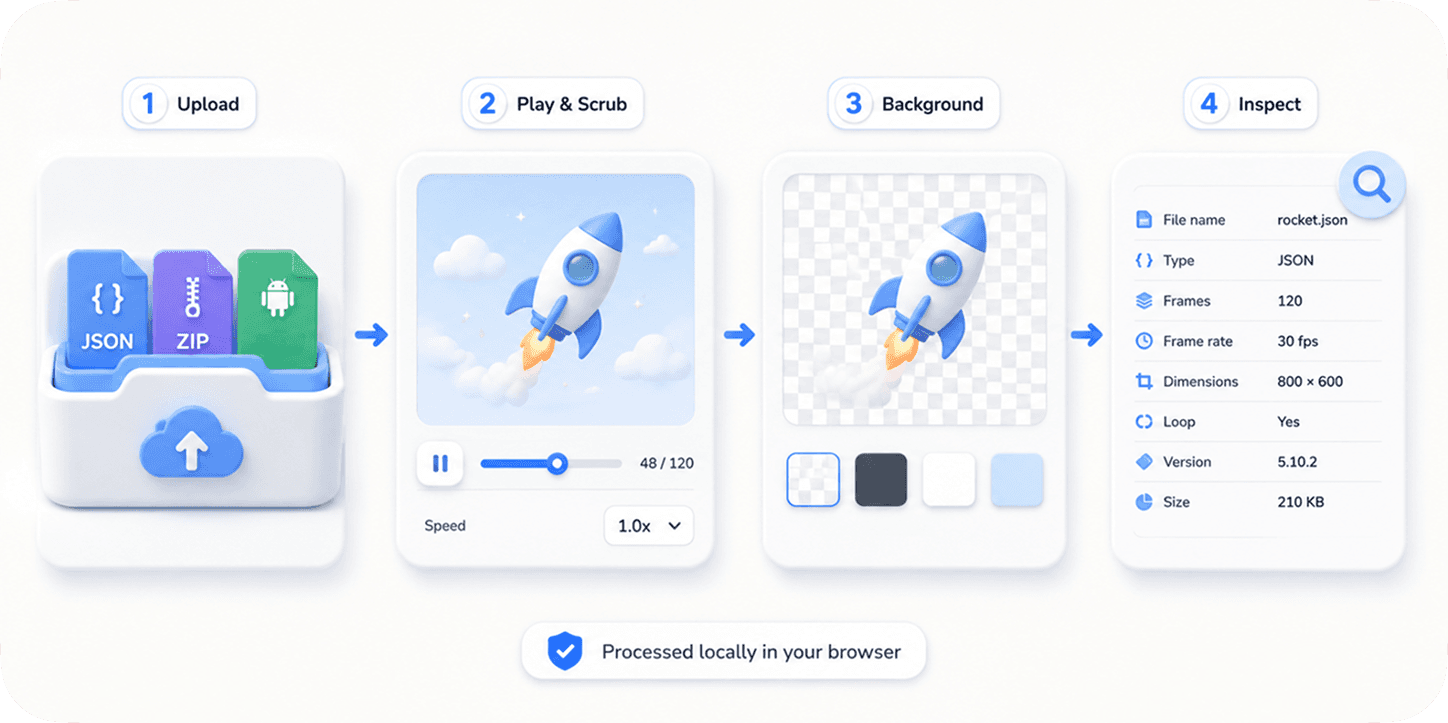
How it works
- 1
Upload JSON, ZIP or .lottie
Drop one or more Lottie files into the browser-based viewer.
- 2
Preview the animation
Play the animation immediately with referenced assets resolved where possible.
- 3
Adjust playback and background
Change speed, loop mode, background color, and preview dimensions.
- 4
Inspect file information
Review metadata and file details before handing off or editing.
- 5
Continue to editing tools
Move to Color Changer or Image Replace when the file needs visual changes.
Why use this tool
Use Preview as the first stop for downloaded, generated, or handoff Lottie files before recoloring, replacing images, or shipping them in an app.
Check downloaded Lottie files before using them in production
Test animation speed and loop behavior
Preview animations on different backgrounds
Inspect file size, dimensions, frame rate, and duration
Prepare files before moving to Color Changer or Image Replace
Frequently asked questions
Is this a free online Lottie viewer?
Yes. EasyLottie Viewer is free, requires no signup, and opens your animation locally in the browser.
How can I preview a Lottie JSON online?
Upload the JSON file to EasyLottie Preview and it will render locally in your browser.
Can I use it as a Lottie JSON viewer and tester?
Yes. You can play, pause, loop, change speed and background, resize the preview, and inspect file metadata.
Can I preview ZIP files with image assets?
Yes. ZIP packages with referenced image assets are supported and resolved by the viewer.
Can I preview a .lottie file?
Yes. EasyLottie opens the dotLottie archive locally and previews the animations it contains.
Are my files uploaded?
No. Files are loaded and rendered locally in your browser.
Can I change playback speed?
Yes. The preview tool includes playback speed controls, loop settings, and stop/play controls.
Can I preview multiple files?
Yes. The tool supports a file list so you can switch between multiple uploaded animations.
Can I reopen a Lottie without uploading it again?
Yes. After a valid file is opened, EasyLottie saves a private local copy in this browser’s Workspace. You can reopen, download, rename, or optionally share it later.
Can I share a Lottie preview with someone else?
Yes. Open the saved project in Workspace, sign in, and create a read-only share link. Local projects remain on your device until you explicitly sync or share them.
Why does my Lottie not render correctly?
Some Lottie files use unsupported expressions, missing external assets, or renderer-specific features. Try checking the file package and referenced asset paths.
Is there an online Lottie player I can use to test an animation?
Yes. This page is a free online Lottie player: drop a JSON, ZIP or .lottie file and it plays immediately with play, pause, scrub, loop and speed controls. Nothing is installed and nothing is uploaded.
How do I test a Lottie animation before adding it to my app or website?
Open it here first. Check that it plays without missing assets, set the loop and speed you plan to ship, try it on light, dark and transparent backgrounds, and read the frame rate, duration and dimensions in the file information panel.
Can I open a .json animation file to see what it looks like?
Yes. If the JSON is a Lottie or Bodymovin export, this viewer renders it. If the file is not a Lottie animation, the viewer tells you instead of showing a blank canvas.