Replace images inside a Lottie file
Detect every image asset in a Lottie JSON, ZIP, or APK, swap any of them with a drag-and-drop, fine-tune the fit, and export a clean package. No After Effects, no signup, nothing uploaded.
The problem
Lottie animations bundle their raster artwork as image assets — a logo, a product screenshot, an avatar, a hero illustration. The moment you want to ship one with your own branding, those placeholder images become the blocker. They are buried inside the file with unhelpful names like img_0.png or image_5.png, and there is no obvious way to get at them.
How the images are packaged makes it worse. Sometimes they are base64-embedded directly in the .json, sometimes they live as external files inside a .zip, and on Android they are tucked inside an .apk. Each packaging style needs different handling, and hand-editing the JSON to repoint or re-encode an asset is fragile — one wrong path or encoding and the whole animation breaks.
The usual fallback — emailing the original designer to re-export from After Effects — costs hours or days and assumes the .aep source still exists. For a single image swap, that round trip is wildly out of proportion to the actual change you need.
The browser workflow
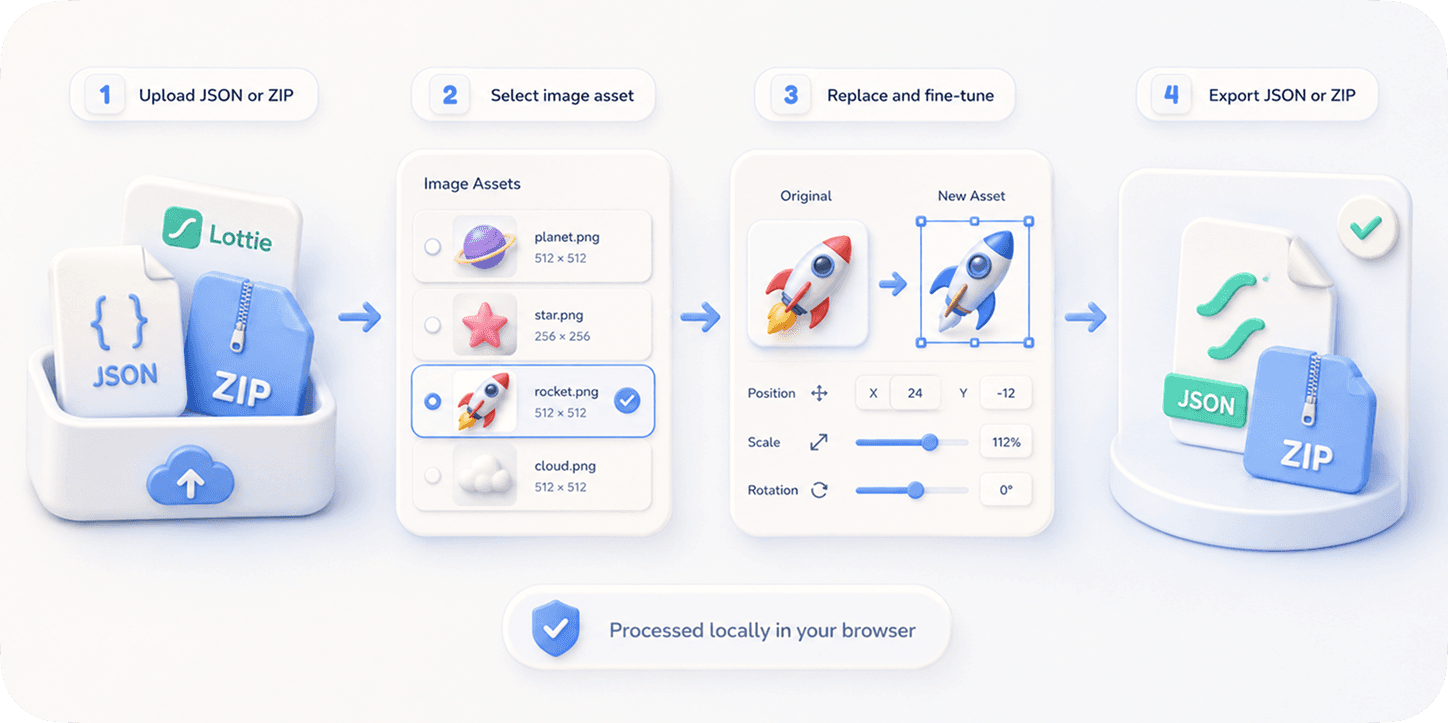
EasyLottie's Image Replace tool reads every image asset inside your file automatically, no matter how it is packaged. Upload a JSON with base64-embedded images, a ZIP with external image files, or an APK, and the tool detects all of them and lays them out as thumbnails so you can see exactly what is in the animation.
Click any asset, drop in your replacement PNG, JPG, or WebP, and the live preview updates instantly. Position, scale, and crop controls let you fit a replacement that has different proportions than the original, and a 20-step undo means you can experiment without fear. Nothing is uploaded — every operation runs locally in your browser, so confidential client and pre-release files never leave your device.
When you export, the tool rebuilds the correct packaging for you: a ZIP-aware export bundles the edited JSON together with all the original and replaced assets, properly renamed and re-linked, ready to drop into lottie-web, lottie-ios, lottie-android, Webflow, or Framer. A single swap takes seconds; a full multi-asset brand customization is usually done in a couple of minutes.
Complete the task
Open Image Replace
Go to easylottie.com/imagereplace. It loads in under a second — no signup, no install, no account state to manage.
Upload your Lottie file
Drag a .json, .zip, or .apk onto the upload area, up to 50 MB. The animation renders live on the left, and every detected image asset appears as a thumbnail on the right.
Pick the image to replace
Click an asset directly in the preview or select its thumbnail from the resource panel. The chosen layer highlights so you always know exactly which asset you are editing.
Drop in your replacement
Drag a PNG, JPG, or WebP onto the selected asset, or use the Replace button. The preview repaints in real time. Repeat for as many assets as you need — there is no per-session limit.
Fine-tune and export
Use the precision controls to scale, offset, and crop the new asset, then export. The download is a ZIP-aware package with the edited JSON and all assets re-linked, ready to ship.
Common use cases
Brand and logo handoff
Bought a marketplace template with a placeholder logo? Detect it, drop in your brand mark, fine-tune the fit, and export a customized animation the same day.
APK asset audits
Pull a Lottie out of an Android .apk to inspect and swap the bundled images without unpacking the archive by hand or rebuilding the app from source.
Localized and A/B variants
Swap text-baked or region-specific images to produce per-market variants, or generate five image versions of an onboarding animation in minutes to test conversion.
Frequently asked questions
Can I replace images inside an APK file?
Yes. Upload an .apk and the tool extracts the Lottie animation and all its image assets, lets you swap any of them, and exports the modified package — no manual unpacking required.
Which packaging formats does it understand?
All three common ones: JSON with base64-embedded images, ZIP with external image files plus the JSON, and APK. The export rebuilds the correct structure for you automatically.
What replacement image formats are supported?
PNG, JPG, JPEG, and WebP. The tool detects the source asset's expected format and re-encodes only when necessary, so quality stays intact unless you choose otherwise.
Will the edited file still play in every Lottie runtime?
Yes. The export is a valid Lottie JSON with standard asset references, so it plays in lottie-web, lottie-ios, lottie-android, Webflow, Framer, and any other Lottie player.
Is my file uploaded to a server?
Never. EasyLottie is browser-only — your source file and replacement images are processed entirely on your device. Files up to 50 MB are supported, with a 20-step undo while you work.