White-label a Lottie animation for every client
Build the animation once, deliver it rebranded for every client. Swap the logo, recolor to their palette, export — 30 seconds per client, no After Effects seat.
The problem
Agencies and freelancers live on reuse. You build a strong onboarding or hero animation once, then sell it — or a variant of it — to client after client. The catch is that each delivery has to look bespoke: their logo, their brand colors, none of your placeholder or the last client's leftovers.
Doing that the official way means opening the .aep in After Effects, swapping the logo, re-tinting layers, and re-exporting for every single client. That is a paid AE seat, a motion designer's time, and a multi-day round trip per rebrand — which quietly eats the margin on a productized animation.
The shortcuts are worse. Hand-editing the JSON to swap a logo PNG and rewrite color hex values is error-prone across dozens of layers, and one mistake ships a broken or off-brand animation straight to a paying client.
The browser workflow
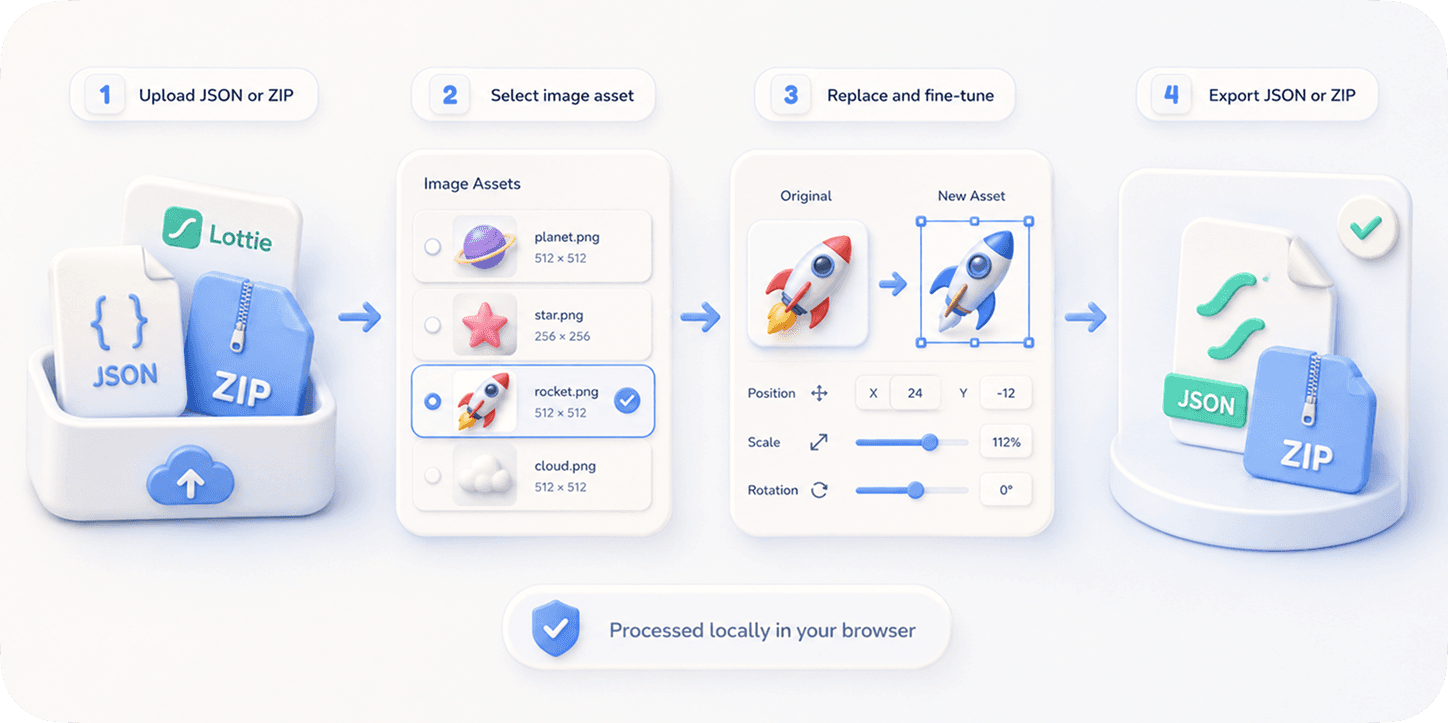
EasyLottie turns a master animation into a per-client production line. Image Replace detects the logo asset (however it is named) and lets you drop in the client's mark in seconds; Color Swap reads the animation's palette and lets you re-map each color to the client's brand hex values.
Both tools are non-destructive and local-only — files never leave the browser, so a confidential client deliverable stays on your machine, never on someone else's server. A 20-step undo means you can experiment with a client's palette and walk it back instantly if it is wrong.
Because there is no install, no signup, and no AE subscription, any team member can do the rebrand — not just the one person who owns the After Effects license. Most agencies report a full logo-plus-recolor rebrand in under two minutes, and batch-produce a whole client roster in an afternoon.
Complete the task
Open your master animation in Image Replace
Go to easylottie.com/imagereplace and drop in the .json or .zip of the animation you reuse across clients. The preview renders live and every image asset is listed.
Swap the logo for the client's mark
Click the logo placeholder in the preview or the resource panel, drop in the client's PNG (transparent background works best), and fine-tune scale and position so it lands exactly right.
Recolor to the client's brand
Head to Color Swap, where the tool lists every color in the animation. Re-map each one to the client's exact brand hex values and watch the preview update in real time.
Export this client's variant
Download the rebranded ZIP — edited JSON plus all assets — ready to hand off. It plays in every Lottie runtime, so the client can drop it straight into their site or app.
Repeat per client
Reload the master file, swap the next client's logo and palette, export again. No per-session limit, no quota — run the whole roster in one sitting.
Common use cases
Productized animation packs
Sell the same polished hero animation to dozens of clients, delivering each a logo-swapped, recolored version in minutes instead of days.
Multi-tenant SaaS branding
Ship one in-app animation that you white-label per enterprise tenant — their logo, their primary color — without an AE round trip for each contract.
Freelance retainer work
Keep a library of master animations and turn around a fully rebranded variant the same hour a retainer client requests it.
Frequently asked questions
Can I swap the logo and recolor in the same workflow?
Yes. Use Image Replace for the logo asset, then Color Swap for the palette. Both run in the browser on the same file, and both keep the export as a standard Lottie package.
How fast is a full per-client rebrand really?
A logo swap is around 30 seconds; a full logo-plus-recolor is typically under two minutes. Trusted by 1,000+ developers and rated 4.9 stars from 200+ reviews, much of that for exactly this batch-rebrand workflow.
Is a confidential client deliverable safe here?
Yes. EasyLottie is browser-only — the master file, the client logo, and the recolored output never leave your device. Nothing is uploaded to a server.
Can a non-designer on my team do the rebrand?
Yes. There is no After Effects, no timeline, and no signup. If a team member can upload a logo and pick brand colors, they can produce a client-ready variant.
Will the rebranded files work for every client's stack?
Yes. Each export is a valid Lottie JSON with standard asset references, so it plays in lottie-web, lottie-ios, lottie-android, Webflow, Framer, and React wrappers.