The browser-based Lottie animation editor
Change colors, replace images, adjust speed, and preview every frame — all in your browser, all for free. EasyLottie is the no-After-Effects way to edit a Lottie file in seconds.
The problem
After Effects is where Lottie animations are born, but it is the wrong tool for editing one after delivery. To change a single color or swap one image you would pay $22.99 a month, install a multi-gigabyte application, learn an unfamiliar timeline interface, and track down the original .aep source — an enormous amount of friction for a 30-second change.
Most people who reach for a Lottie editor are not motion designers. They are developers, founders, and marketers who already have a finished animation and just need to adapt it: recolor it for dark mode, drop in real branding, slow it down, or confirm it loops correctly before it ships. None of those tasks belongs in a professional authoring suite.
The online alternatives carry their own catches. Many are feature-locked behind a paid plan, watermark the output, cap you at a few files per month, or quietly upload your animation to their servers — a non-starter when the file is an unreleased product asset or confidential client work.
The browser workflow
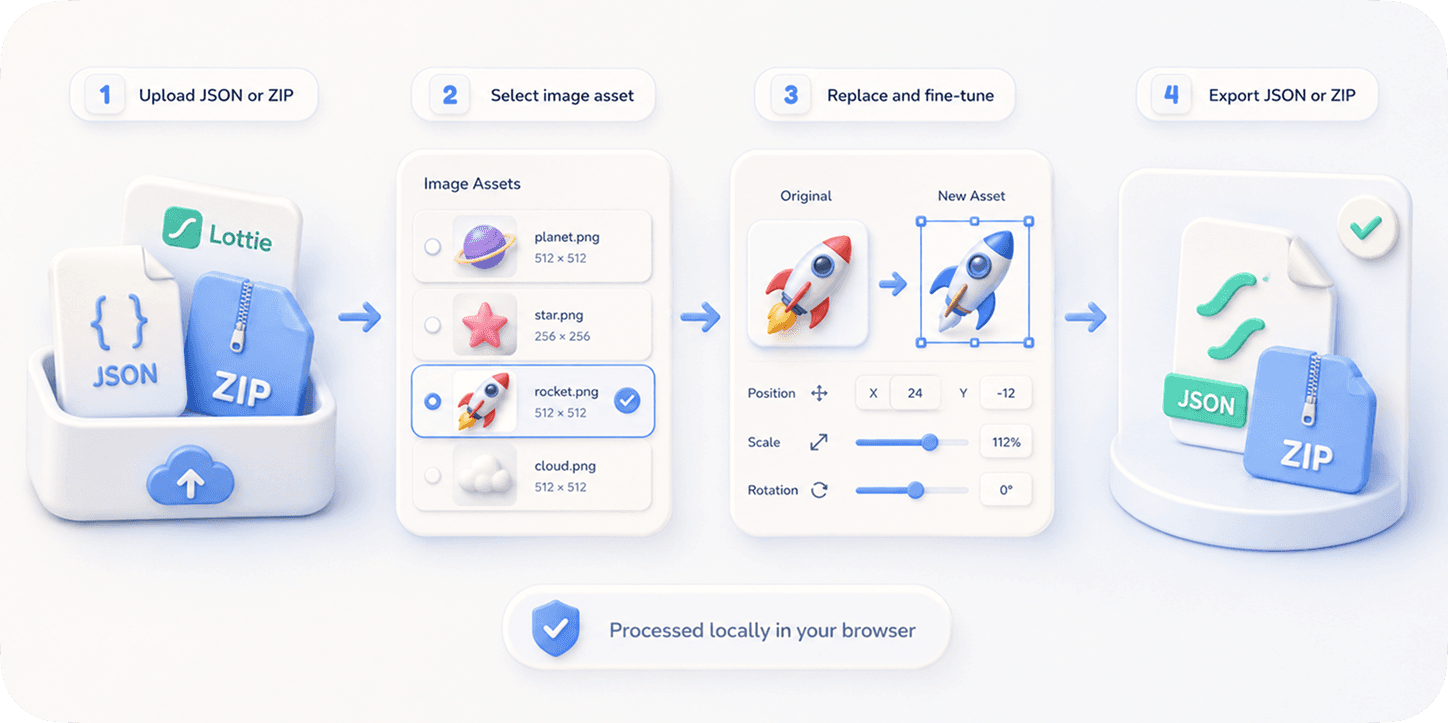
EasyLottie is a focused, browser-only Lottie editor built for the edits people actually make after a file is delivered. It bundles the four most common operations — color change, image replacement, speed adjustment, and live preview — into simple tools that each do one job well, with no timeline, keyframes, or layers panel to learn.
The Color Editor auto-detects every color in the animation and lets you swap any of them with a live preview, perfect for brand matching and dark-mode themes. Image Replace detects and swaps embedded assets across JSON, ZIP, and APK files. Preview plays, scrubs, and re-speeds your animation so you can verify it before deployment. A 20-step undo backs every edit so experimenting is safe.
Everything runs locally in your browser — your file is never uploaded — and the whole toolkit is free with no signup, no watermark, and no usage cap. It works on a phone, a Chromebook, or a locked-down corporate laptop without admin rights. Trusted by 1,000+ developers and rated 4.9★ across 200+ reviews, it handles files up to 50 MB and exports clean JSON or ZIP that plays anywhere Lottie does.
Complete the task
Open easylottie.com
The editor loads in under a second with no account and nothing to install. Pick the homepage to see all tools, or jump straight to the one you need.
Choose the edit you need
Color Editor for palette and dark-mode changes, Image Replace for swapping embedded assets, or Preview for inspection and speed adjustments.
Drop your Lottie file in
Upload a JSON, ZIP, or APK up to 50 MB. The animation renders instantly and the editable layers, colors, or assets populate automatically.
Make your change
Recolor a layer, swap an image, or adjust the playback speed. Every change appears immediately in the live preview, with a 20-step undo if you want to backtrack.
Export and ship
Download the edited JSON or ZIP. It works in lottie-web, lottie-ios, lottie-android, Webflow, Framer, and anywhere else Lottie plays.
Common use cases
Brand customization
A freelancer delivered an animation in their own palette and placeholder imagery. Recolor it and swap the assets to match your brand in under two minutes.
Dark-mode adaptation
An animation authored for a light interface looks wrong on a dark background. Recolor every layer for a dark theme without reopening the source file.
Pre-launch QA
Before deploying, preview the animation, check the loop and speed, and confirm the rendering is correct across the JSON or ZIP you are about to ship.
Frequently asked questions
Can I edit a Lottie animation without After Effects?
Yes — that is exactly what EasyLottie is for. Change colors, replace images, and adjust speed directly in your browser, with no After Effects license and no original .aep source required.
What kinds of edits can I make?
Color swaps and dark-mode palettes, embedded image replacement, playback speed and loop adjustments, and full live preview. It covers the most common post-delivery edits, not from-scratch authoring.
Is it really free, and do I need to sign up?
Completely free with no signup, no watermark, and no usage cap. There is no premium tier — every feature is available to everyone.
Are my files uploaded anywhere?
No. Every operation happens locally in your browser, so your animation never leaves your device. Files up to 50 MB are supported with a 20-step undo.
What file formats does the editor support?
Standard Lottie JSON, ZIP packages containing a Lottie plus its images, and APK files. Exports work in lottie-web, lottie-ios, lottie-android, Webflow, and Framer.